The levels and key measures

Read more : Small , the link will open in a new tab.
three people behind a computer

Small

The starting level Small allows an organisation to make an initial assessment, excluding the aspects related to the internal development of applications. The starting level Small is intended for micro-organisations or organisations with limited technical knowledge.

Download

Read more : CyFun® BASIC , the link will open in a new tab.
three people behind a computer

CyFun® BASIC

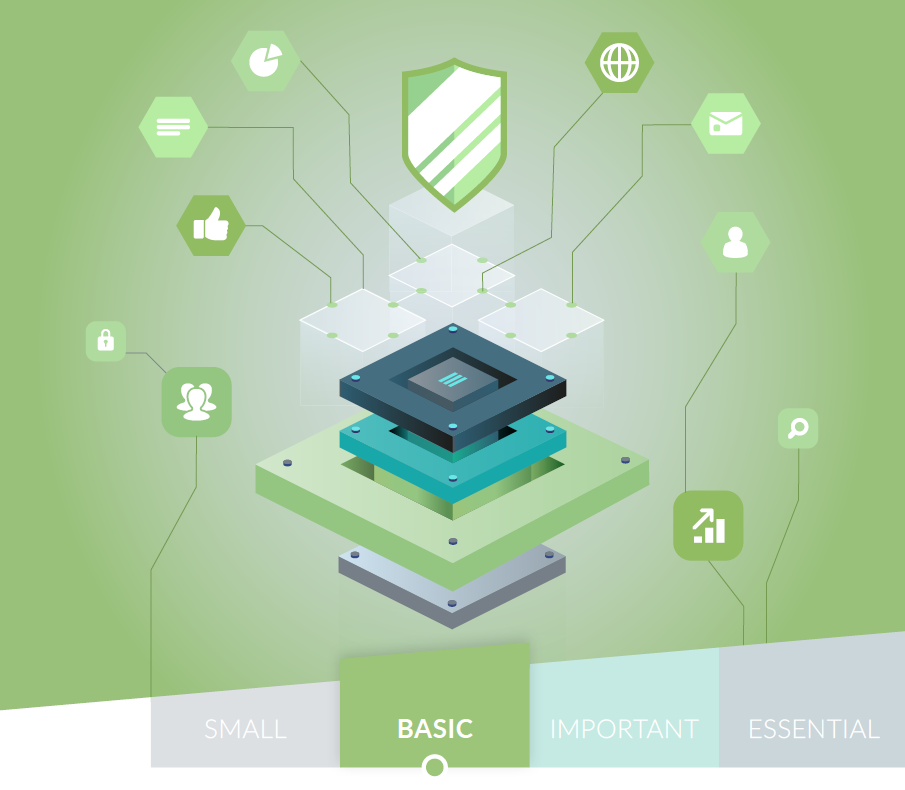
The assurance level Basic contains the standard information security measures for all enterprises. These provide an effective security value with technology and processes that are generally already available. Where justified, the measures are tailored and refined.

Download

Read more : CyFun® IMPORTANT , the link will open in a new tab.
three people behind a computer

CyFun® IMPORTANT

The assurance level Important is designed to minimise the risks of targeted cyber-attacks by actors with common skills and resources in addition to known cyber security risks.

Download 

Read more : CyFun® ESSENTIAL , the link will open in a new tab.
three people behind a computer

CyFun® ESSENTIAL

The assurance level Essential goes one step further and is designed to address the risk of advanced cyber-attacks by actors with extensive skills and resources.

Download 

Maturity level use cases

Read more : Use cases BASIC , the link will open in a new tab.
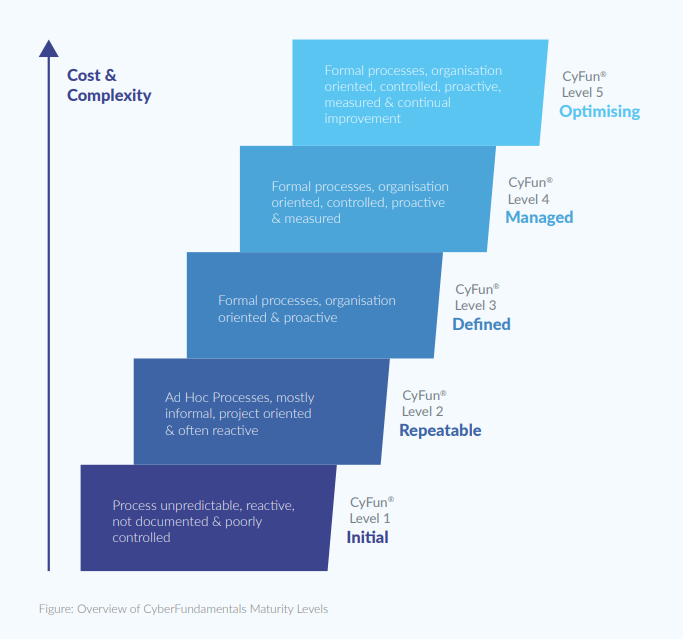
A staircase diagram illustrating the CyberFundamentals Maturity Levels, with an upward arrow labeled “Cost & Complexity” on the left. There are 5 levels: Initial, Repeatable, Defined, Managed, Optimising

Use cases BASIC

This document provides a detailed description of the maturity levels and practical use cases of the Basic assurance level to help you assess your maturity level for the framework. 

Download 

Read more : Use cases IMPORTANT , the link will open in a new tab.
A staircase diagram illustrating the CyberFundamentals Maturity Levels, with an upward arrow labeled “Cost & Complexity” on the left. There are 5 levels: Initial, Repeatable, Defined, Managed, Optimising

Use cases IMPORTANT

This document provides a detailed description of the maturity levels and practical use cases of the Important assurance level to help you assess your maturity level for the framework. 

Download 

Read more : Use cases ESSENTIAL , the link will open in a new tab.
A staircase diagram illustrating the CyberFundamentals Maturity Levels, with an upward arrow labeled “Cost & Complexity” on the left. There are 5 levels: Initial, Repeatable, Defined, Managed, Optimising

Use cases ESSENTIAL

This document provides a detailed description of the maturity levels and practical use cases of the Essential assurance level to help you assess your maturity level for the framework. 

Download 

Self-Assesment tool

Read more : Self-Assessment BASIC , the link will open in a new tab.
cover_of_the_basic_booklet

Self-Assessment BASIC

This CyFun® Self-Assessment tool is a MS Excel format tool that prepares entities with assurance level 'Basic' and includes spider diagrams to support management reporting.

Download 

Read more : Self-Assessment IMPORTANT , the link will open in a new tab.
cover_of_the_important_booklet

Self-Assessment IMPORTANT

This CyFun® Self-Assessment tool is a MS Excel format tool that prepares entities with assurance level 'Important' and includes spider diagrams to support management reporting.

Download 

Read more : Self-Assessment ESSENTIAL , the link will open in a new tab.
cover_of_the_essential_booklet

Self-Assessment ESSENTIAL

This CyFun® Self-Assessment tool is a MS Excel format tool that prepares entities with assurance level 'Essential' and includes spider diagrams to support management reporting.

Download 

How to use the self-assessment tool?

1. General

In support of the ‘CyberFundamentals Framework’ the Centre for Cybersecurity Belgium (CCB) has developed a tool in MS© Excel.

The self-assessment tool takes into account the requirements for assurance level 'Basic', assurance level 'Important' and assurance level 'Essential' of a specific version of the framework as well as the requirements identified in the Conformity Assessment Scheme (CAS). The versions of the CyberFundamentals framework and CAS with which the tool is aligned, are identified in the tool. For this reason, the tool shall not be modified as part of any verification or certification activity.
 

2. Tool layout

The self-assessment tool in MS© Excel includes several tabs, each with its own function. Besides introduction, maturity levels and references, there are the tabs with the controls for assurance level ‘Basic’, ‘Important’ and ‘Essential’ (‘details’ tab) and for each assurance level a summary (‘summary’ tab).

The controls are assessed through two angles:

  • Policy Maturity: The Policy Maturity evaluation measures how well your written rules and procedures satisfy the controls of the CyberFundamentals Framework.

  • Implementation maturity: The Implementation Maturity evaluation assess how mature your actual operational practices are in relation to the CyberFundamentals Framework.

The table below shows the different maturity levels and the definitions used to assess maturity from both perspectives:
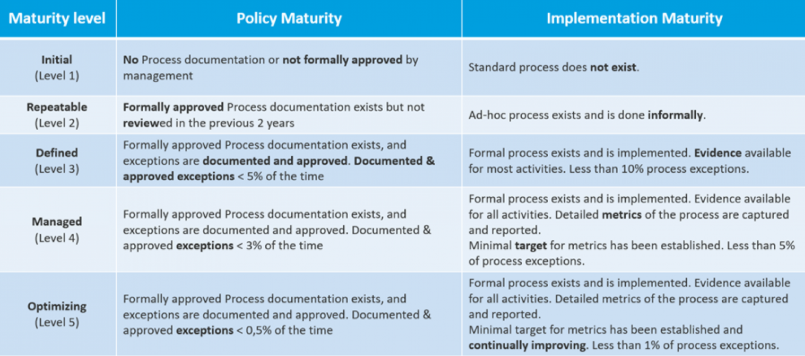
A table comparing five CyberFundamentals maturity levels across two dimensions: Policy Maturity and Implementation Maturity. The rows represent levels from bottom to top:   Initial (Level 1):  Policy: No process documentation or not formally approved by management. Implementation: Standard process does not exist.    Repeatable (Level 2):  Policy: Formally approved process documentation exists but not reviewed in the previous 2 years. Implementation: Ad-hoc process exists and is done informally.    Defined (Level 3):  Policy: Formally approved process documentation exists; exceptions are documented and approved. Documented and approved exceptions occur less than 5% of the time. Implementation: Formal process exists and is implemented. Evidence available for most activities. Less than 10% process exceptions.    Managed (Level 4):  Policy: Formally approved process documentation exists; exceptions documented and approved. Documented and approved exceptions occur less than 3% of the time. Implementation: Formal process exists and is implemented. Evidence available for all activities. Detailed metrics captured and reported. Minimal target for metrics established. Less than 5% process exceptions.    Optimizing (Level 5):  Policy: Formally approved process documentation exists; exceptions documented and approved. Documented and approved exceptions occur less than 0.5% of the time. Implementation: Formal process exists and is implemented. Evidence available for all activities. Detailed metrics captured and reported. Minimal target for metrics established and continually improving. Less than 1% process exceptions.
3. Calculation method
  • A sub-category may consist of several controls and each of those controls shall be assessed for documentation and implementation according to the maturity table above. A value from 1 to 5 has to be entered per control in the "details" tab of the applicable assurance level. The tool calculates an arithmetic average for documentation and implementation per sub-category (e.g. ID.AM-1) to then calculate another arithmetic average for documentation and implementation per category (e.g. ID.AM).

  • These calculated values are visible in the ‘details’ tab of the applicable assurance level.

4. Summary report
  • The ‘summary’ tab for the respective CyberFundamentals assurance levels contains:

  • An overall maturity level (‘Total Maturity Level’) calculated as an arithmetic mean of the maturity levels of the categories.
  • A summary of the different maturity levels for each category using the respective values of the arithmetic averages of what was calculated in the ‘details’ tab.
  • A listing of the key measures to be met, the data for which is taken from the values entered in the ‘details’ tab.
  • A radar chart (spider chart ) is also displayed based on the data from the summary of categories.


Determining conformity with the Conformity Assessment Scheme (CAS)

  • The overview includes the target scores as determined for the specific assurance levels as described in the CAS. It is against these target scores that the values of the self-assessment are assessed.

  • When the values colour red one is not conforming to the required maturity level, green shows conformance.